> ## Documentation Index
> Fetch the complete documentation index at: https://docs.metamcp.com/llms.txt
> Use this file to discover all available pages before exploring further.

# MetaMCP Documentation

> MCP Aggregator, Orchestrator, Middleware, Gateway in one docker

<div align="center">
  <img src="https://mintcdn.com/metamcp/3-l_3rfDmCoCDXLO/images/metamcp.svg?fit=max&auto=format&n=3-l_3rfDmCoCDXLO&q=85&s=6bd0c36a8be3c6a89abe9e60ab6de761" alt="MetaMCP Diagram" style={{ width: "100%", maxWidth: "600px", margin: "2rem 0" }} width="733" height="402" data-path="images/metamcp.svg" />

  **MetaMCP** is a MCP proxy that lets you dynamically aggregate MCP servers into a unified MCP server, and apply middlewares. MetaMCP itself is a MCP server so it can be easily plugged into **ANY** MCP clients.
</div>

## 🎯 Use Cases

<CardGroup cols={2}>
  <Card title="Group & Host MCP Servers" icon="folder-open">
    Group MCP servers into namespaces, host them as meta-MCPs, and assign public endpoints (SSE or Streamable HTTP) with authentication.
  </Card>

  <Card title="Cherry-pick Tools" icon="pointer">
    Pick only the tools you need when remixing MCP servers. Apply pluggable middleware for observability and security.
  </Card>

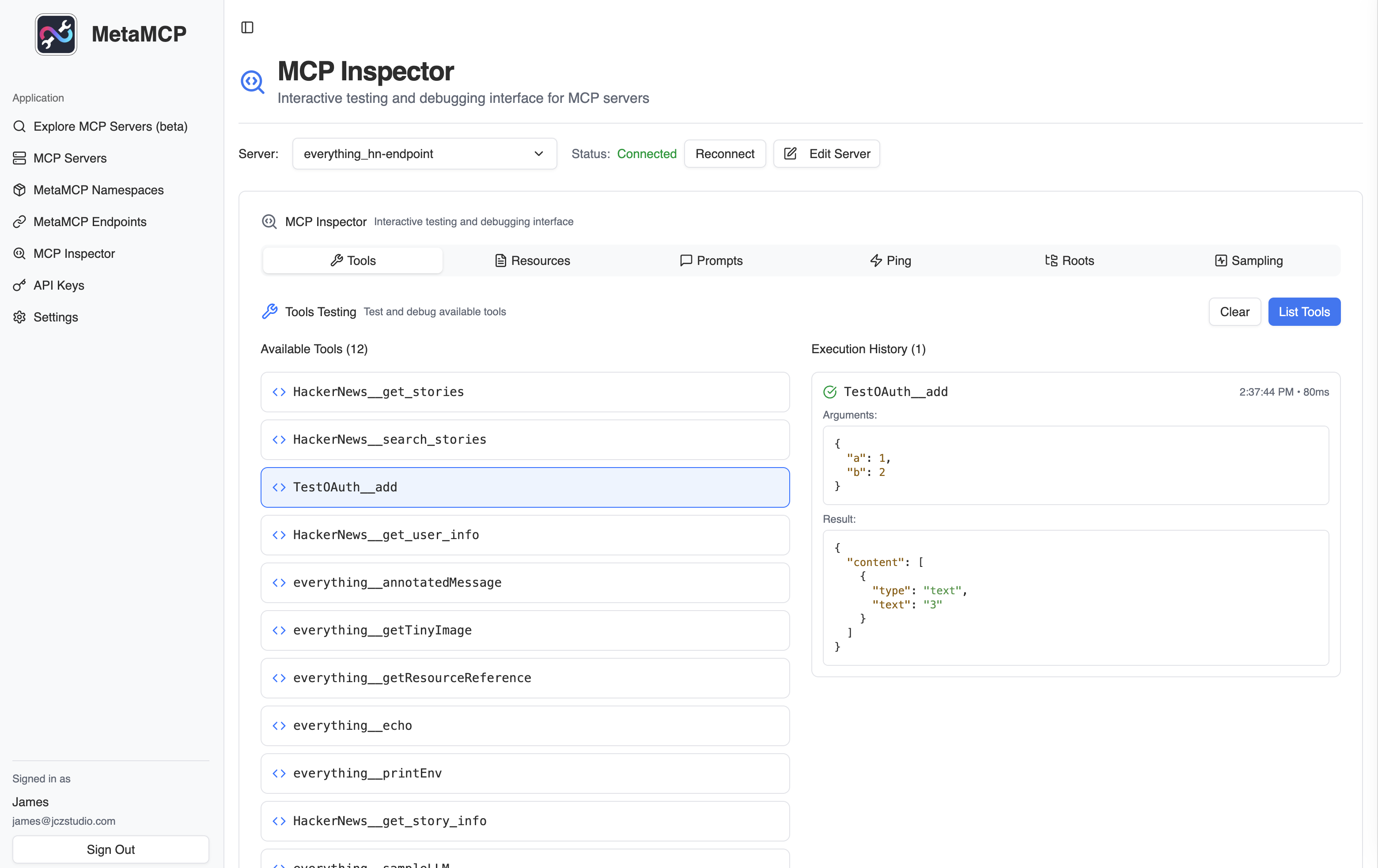
  <Card title="Enhanced Inspector" icon="search-code">
    Use as enhanced MCP inspector with saved server configs, and inspect your MetaMCP endpoints.
  </Card>

  <Card title="Context Engineering Engine for MCP" icon="search">
    Use as Elasticsearch for MCP tool selection (coming soon).
  </Card>
</CardGroup>

Generally developers can use MetaMCP as **infrastructure** to host dynamically composed MCP servers through a unified endpoint, and build agents on top of it.

<div align="center">
  <img src="https://mintcdn.com/metamcp/3-l_3rfDmCoCDXLO/images/metamcp_screenshot.png?fit=max&auto=format&n=3-l_3rfDmCoCDXLO&q=85&s=ec1bb0139080a11c37660ba169e9828b" alt="MetaMCP Screenshot" style={{ width: "100%", maxWidth: "800px", margin: "2rem 0", borderRadius: "8px", boxShadow: "0 4px 6px rgba(0, 0, 0, 0.1)" }} width="3120" height="1966" data-path="images/metamcp_screenshot.png" />
</div>

## Quick Start

Get MetaMCP running in minutes with Docker Compose:

<CodeGroup>
  ```bash Clone & Setup theme={null}
  git clone https://github.com/metatool-ai/metamcp.git
  cd metamcp
  cp example.env .env
  ```

  ```bash Start with Docker theme={null}
  docker compose up -d
  ```
</CodeGroup>

<Card title="Continue with Quickstart Guide" icon="rocket" href="/en/quickstart">
  Follow our complete setup guide to configure your first MCP servers and namespaces.
</Card>

## Core Concepts

Understanding these key concepts will help you get the most out of MetaMCP:

<CardGroup cols={2}>
  <Card title="MCP Servers" icon="server" href="/en/concepts/mcp-servers">
    Learn how to configure and manage MCP server instances.
  </Card>

  <Card title="Namespaces" icon="package" href="/en/concepts/namespaces">
    Group MCP servers and apply middleware at the namespace level.
  </Card>

  <Card title="Endpoints" icon="globe" href="/en/concepts/endpoints">
    Create public endpoints for your namespaces with different transport options.
  </Card>

  <Card title="Middleware" icon="filter" href="/en/concepts/middleware">
    Transform MCP requests and responses with pluggable middleware.
  </Card>
</CardGroup>

## Integrations

Connect MetaMCP to your favorite tools and platforms:

<CardGroup cols={2}>
  <Card title="Cursor" icon="mouse-pointer-2" href="/en/integrations/cursor">
    Configure Cursor to use MetaMCP endpoints via mcp.json
  </Card>

  <Card title="Claude Desktop" icon="monitor-dot" href="/en/integrations/claude-desktop">
    Connect Claude Desktop using mcp-proxy for STDIO compatibility
  </Card>
</CardGroup>

## Features

<AccordionGroup>
  <Accordion icon="shield" title="Enterprise Authentication">
    * Better Auth for frontend & backend
    * Session cookies for secure connections
    * API key authentication for external access
    * OpenID Connect (OIDC) support for enterprise SSO
    * Multi-tenancy with public/private scopes
  </Accordion>

  <Accordion icon="network" title="Multiple Transport Options">
    * **SSE (Server-Sent Events)** for MCP backward compatibility and real-time connections
    * **Streamable HTTP** for Streamable HTTP-based MCP communication (now standard remote MCP connection)
    * **OpenAPI endpoints** compatible with clients like Open WebUI
    * **STDIO compatibility** via proxy for local
  </Accordion>

  <Accordion icon="globe" title="Internationalization">
    * Built-in support for English and Chinese
    * Easy to add additional languages
    * Locale-based routing and content
  </Accordion>

  <Accordion icon="chart-line" title="Performance & Scalability">
    * Pre-allocated idle sessions for reduced cold start time
    * Configurable session management
    * Designed for at least 2GB-4GB memory instances
    * Docker-based deployment with nginx support
    * Cluster scaling and separation of MCP manager and worker will release in the future.
  </Accordion>
</AccordionGroup>

## Getting Help

<CardGroup cols={2}>
  <Card title="Contributing to MetaMCP" icon="code" href="/en/development/contributing">
    Set up a local development environment and contribute to MetaMCP.
  </Card>

  <Card title="API Reference" icon="book" href="/en/api-reference/introduction">
    Explore the complete API documentation for MetaMCP endpoints.
  </Card>

  <Card title="GitHub Issues" icon="github" href="https://github.com/metatool-ai/metamcp/issues">
    Report bugs, request features, or browse existing issues.
  </Card>

  <Card title="Discord Community" icon="discord" href="https://discord.gg/mNsyat7mFX">
    Join our Discord server for support and community discussions.
  </Card>
</CardGroup>
